 Edit webpage text
Rewrite text directly on any webpage
Click visible text and type right where it appears—no developer tools, no code, and no confirmation dialog. Edit Page is built for quick mockups, copy reviews, and visual experiments.
Chrome and Microsoft Edge · Start free · No sign-up required
A faster way to test words in context
Type directly on the page
Place the caret in visible text and edit it as naturally as a document.
Review copy in its real layout
See line breaks, spacing, and visual hierarchy before handing copy to a developer.
Undo without risk
Changes stay in your browser. Undo individual edits or refresh the page to restore the original.
Edit words, then format the exact text you selected
Edit Page has two complementary text workflows. Edit text turns the page body into an editable surface with its own history controls. When you select words, the optional Text formatting toolbar lets you change their appearance without restyling the surrounding element.
Type directly in the page and keep every change reversible
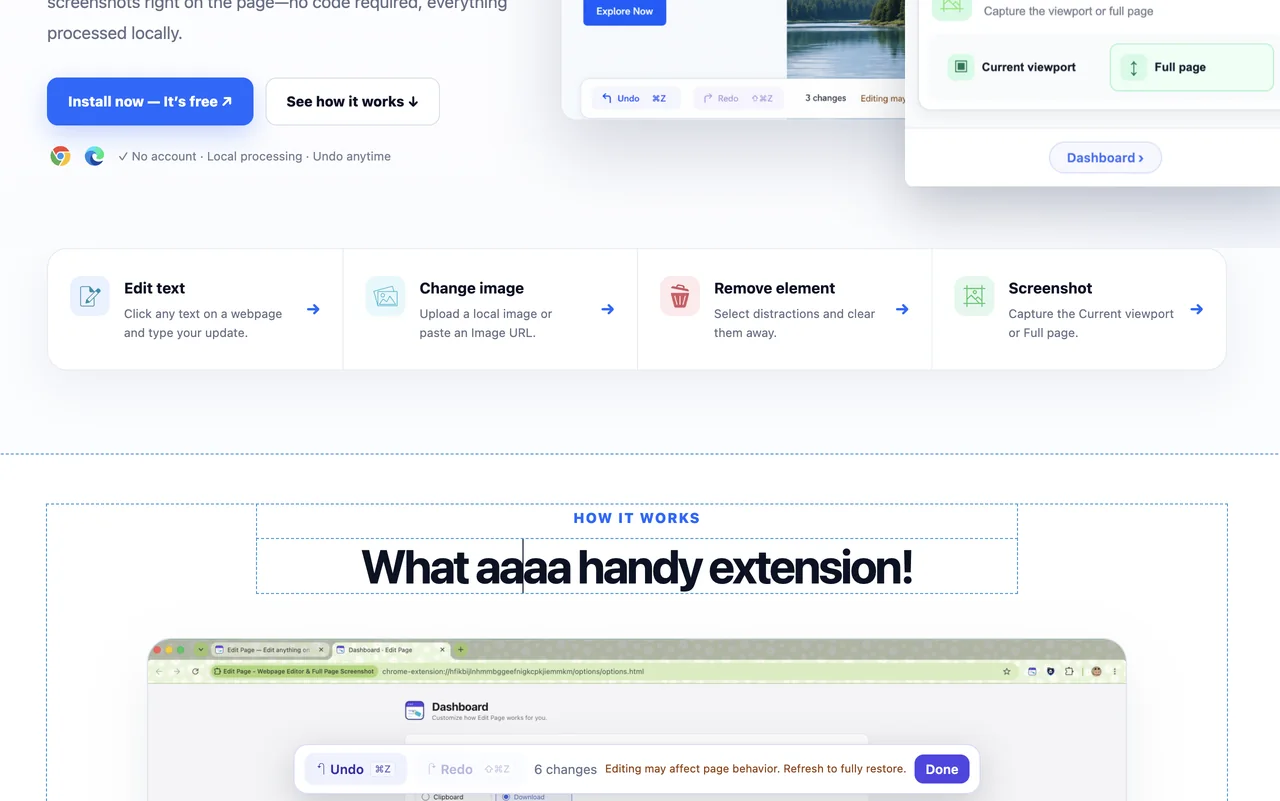
Choose Edit text from the Popup, click visible copy, and type in place. A page-level history toolbar stays available while you work, showing Undo, Redo, Done, the change count, and editing guidance.
- Continuous typing in the same element is grouped into a useful history step instead of one step per keystroke.
- Undo and Redo move through text edits and formatting changes in order.
- Choose Done when the mockup is ready, or refresh the tab to restore the original webpage.
Format only the words you select
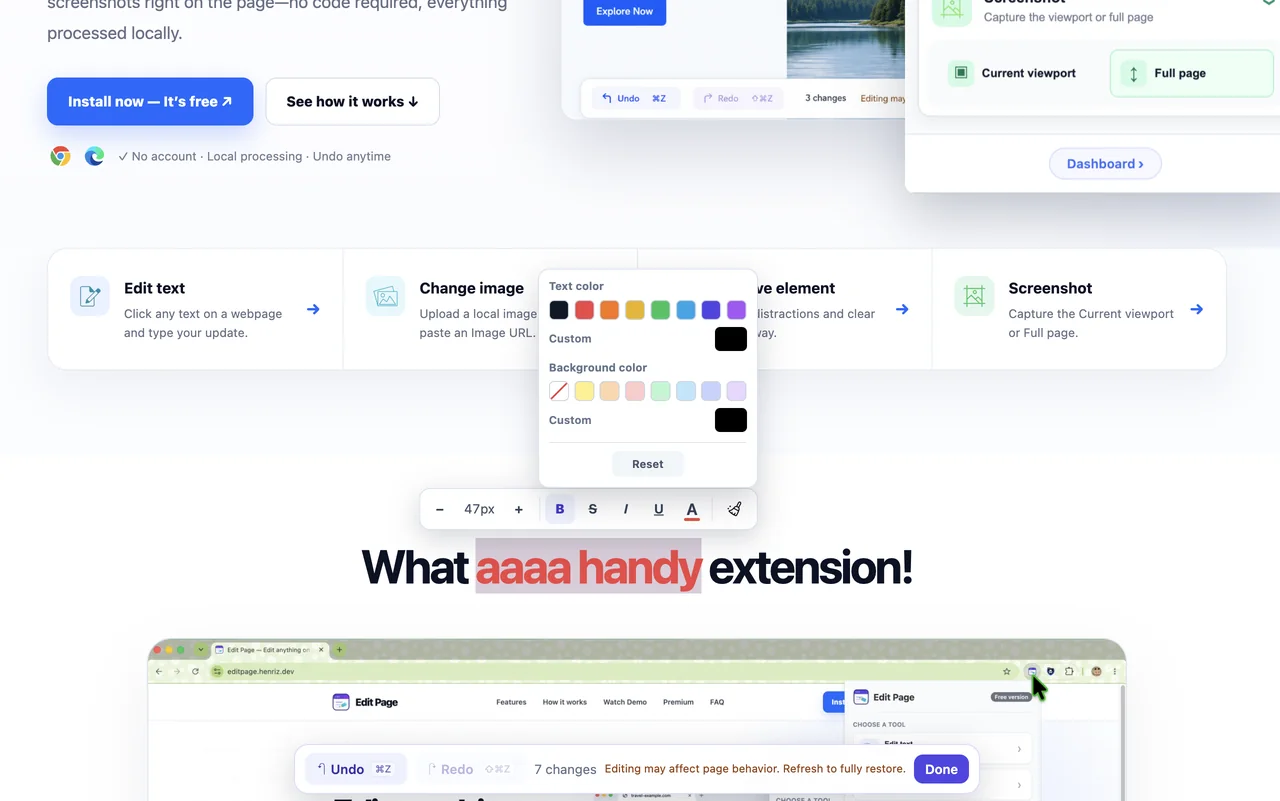
With “Show toolbar when text is selected” enabled in Settings, selecting non-empty text opens the Text formatting toolbar near the selection. It moves below the selection when there is not enough space above.
- Decrease or increase font size, with the current size shown between the controls; mixed selections display Mixed.
- Apply bold, strikethrough, italic, underline, text color, or background color.
- Reset a color or restore the selected text to its original formatting without changing nearby copy.
Keep the toolbar optional and understand the free allowance
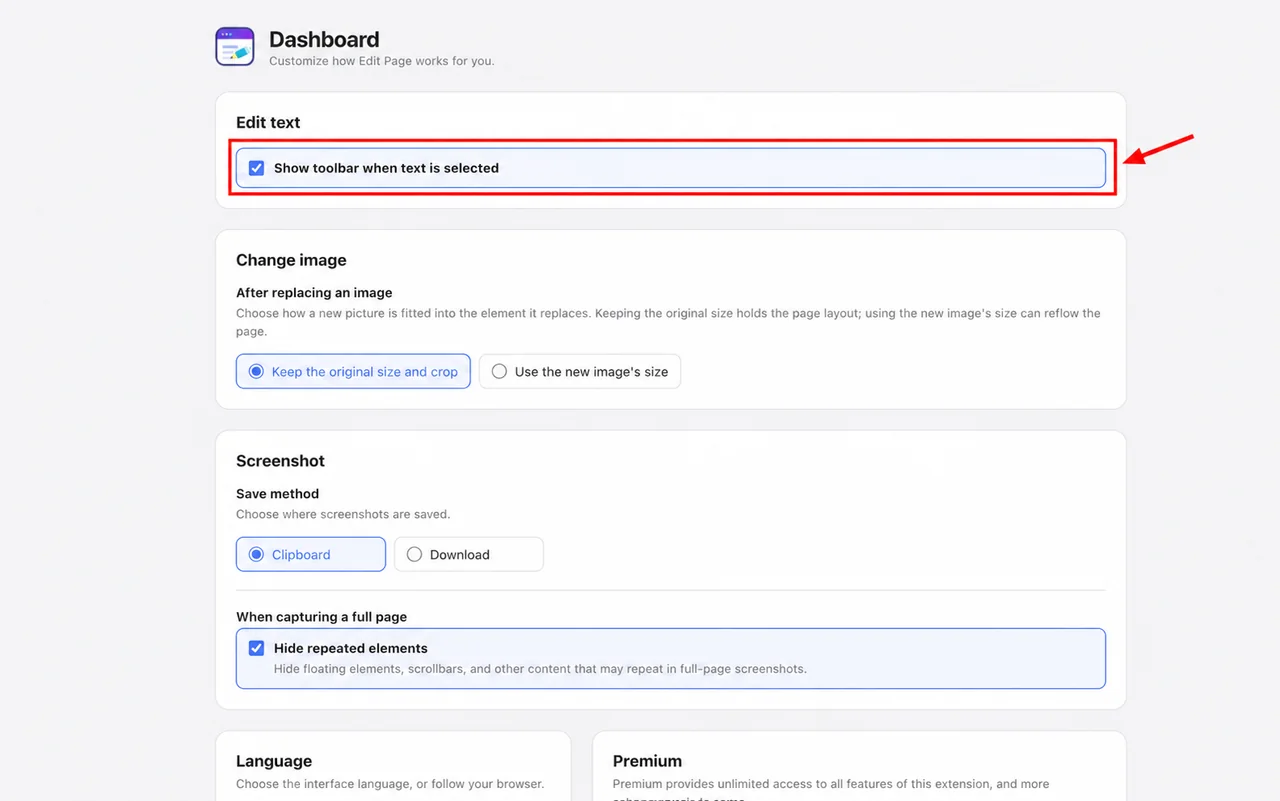
The toolbar is enabled by default. Turn off “Show toolbar when text is selected” under Settings → Edit text when you want a distraction-free typing workflow.
- Editing and typing text do not consume the Text formatting allowance.
- The free plan includes 30 toolbar actions, including font-size and reset actions.
- Premium removes the formatting allowance; Undo and Redo never consume it.
Edits happen in your current browser tab. Edit Page does not upload webpage content, and a refresh restores the original.
How to edit webpage text
- 1Step 1
Open the extension
Visit a regular webpage, open Edit Page, and choose Edit text.
- 2Step 2
Click and type
Click the text you want to change. A caret appears so you can edit it in place.
- 3Step 3
Review or capture
Check the updated layout, then take a screenshot or simply refresh to restore the page.
Useful for more than quick copy edits
Product and design reviews
Try shorter labels, clearer calls to action, and alternate headlines in the live layout.
Localization previews
Check whether translated strings fit before engineering work begins.
Content approvals
Create realistic screenshots that help clients and teammates review proposed wording.
Good to know
- Browsers block extensions on protected pages such as the Chrome Web Store and internal browser pages.
- If clicking linked text navigates away, start editing nearby text first, then use the arrow keys to move the caret into the linked element.
- Edits are temporary and local to the current tab; refreshing restores the original webpage.
Webpage text editing FAQ
Does Edit Page change the real website?
No. Your edits are applied locally in the current browser tab and are not uploaded to or saved by the website.
Do I need HTML or developer tools?
No. Choose Edit text, click visible text, and type directly on the page.
Can I edit text inside a link?
Usually yes. If the link opens when clicked, enter edit mode on nearby text and move the caret with the keyboard arrow keys.
Can I format only part of a sentence?
Yes. Select the exact words you want to change, then use the Text formatting toolbar. Formatting applies only to the selected text.
Are text edits limited on the free plan?
Typing and editing text are not limited. The free plan includes 30 Text formatting actions; using that allowance locks advanced features for 12 hours.
Explore other Edit Page tools


Ready to edit the web your way?
Install the extension and start on any regular webpage.